- Latest Updates:
-
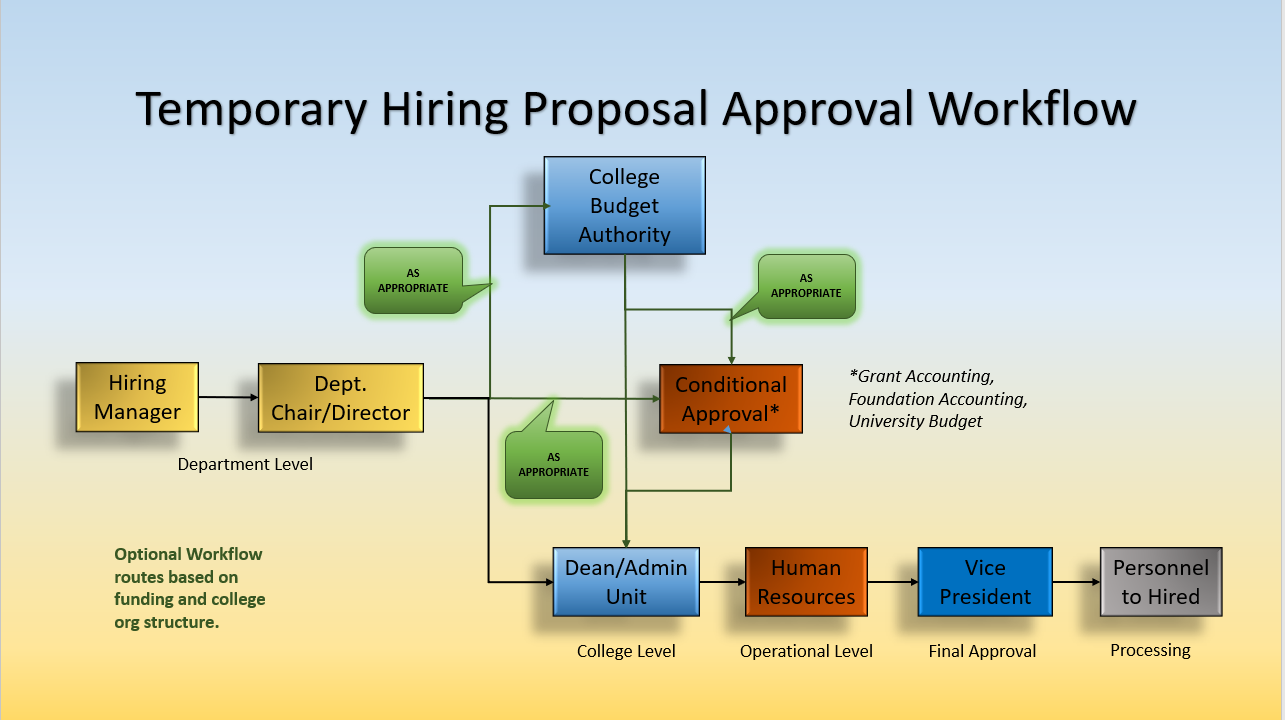
UPDATED EJOBS TEMPORARY HIRING PROPOSAL WORKFLOW:
- How-To's
-
New Temporary Hires in eJobs: Temporary Employee Procedure
Temporary Contract Renewals: eContract User Guide
Hiring from a General Temp Pool:
First, request an application from the pool be moved to your department. Email HR@ETSU.EDU and include:
• The applicant name and contact information
• The type of appointment, support staff or administrative staff
• The department name and organization codeSecond, as the Applicant Reviewer, update applicant workflow status to "Recommend for Hire".
Third, as the Hiring Manager, select "Start Temporary Hiring Proposal" option.
Finding Your Assigned Temporary Position Numbers: Temp Position Number Assignment
Understanding your Approval Chain: Approval Chain Lists
Viewing Applicants in the General Temp Pools:
Request Guest User access to the posting by emailing HR@ETSU.EDU Include the following information:
-
- Your Username
- Posting name/number
Temporary Faculty Renewals: Temporary faculty renewal contracts should be submitted under faculty contract renewals in eContracts.
Request additional assistance: Email HR@ETSU.EDU or Contact the HR Business Partner for your Area.
-
- Additional Training and User Guides
What is a Temporary Hire?
-
Definition
Temporary Employees-
All personnel whose initial period of appointment or expected service is less than one year. This definition should not be confused with employees who are designated as probationary employees, who may be regular full-time or part-time employees, and who are entitled to all leave benefits of such employees. If temporary assignments are recurring, then the university must make a decision to create and fund a regular position.
"Temporary employees" are ineligible for State benefits (retirement, state insurance, annual and sick leave, and holiday pay or longevity credit). However, limited term faculty appointments may be designated as positions eligible for benefits when budgeted. Temporary employees working on average at least 30 hours per week over a specified measurement period will be offered medical benefits under the Affordable Care Act (ACA).
After one year of employment as a temporary employee, the university shall consider adding a position with benefits if the assignment is needed on a regular basis. The process for filling the position will follow the Guidelines for Filling Faculty, Administrative, and Clerical/Support Vacancies.
Temporary employees contracted through a temporary staffing agency or as an Independent Contractor are not university employees. Once an Independent Contractor has been placed on Payroll, they are considered an employee and will no longer be able to be an Independent Contractor.
-
Classifications
- Temp Hourly (Account Code: 61320)
-
- Includes: Temporary Support Staff Positions, Contracts of 1 month or less, PRN (pro re nata-"as the need arises") contracts;
- Requires: Minimum Salary of $7.25 per Hour;
- Individual MUST record hours worked;
- Overtime eligible;
- Becomes eligible for ACA Health Benefits if individual works 30+ hours per week
- Temp Monthly (Account Code: 61620)
-
- Includes: Temporary Faculty Appointments (not Adjunct appointments), Administrative/Professional Temporary;
- Requires: Minimum monthly salary of $3,657.33;
- Works is administrative in nature;
- Individual NOT eligible for overtime;
- Works 37.5 hours per week;
- Eligible for ACA Health Benefits
-
Additional Information
When is a Temporary Hire Appropriate?
Temporary employees are generally hired for emergency and/or peak period situations. Temporary positions are defined as those positions expected to last one calendar year or less. This definition should not be confused with employees who are designated as probationary employees, who may be regular full-time or part-time employees and who are entitled to all leave benefits of such employees.
Examples:
-
- Project based assignment.
- Seasonal work.
- PRN or as needed basis.
Due to the nature of temporary positions, most will not require advertising. ETSU maintains a pool of applicants who have indicated their desire to work temporary assignments at ETSU. For access to the Temporary Staff Pool, contact Human Resources at HR@etsu.edu for the guest user login.
Applicants may apply for temporary and PRN positions through the eJobs system, and jobs are posted on www.etsu.edu/jobs.
-
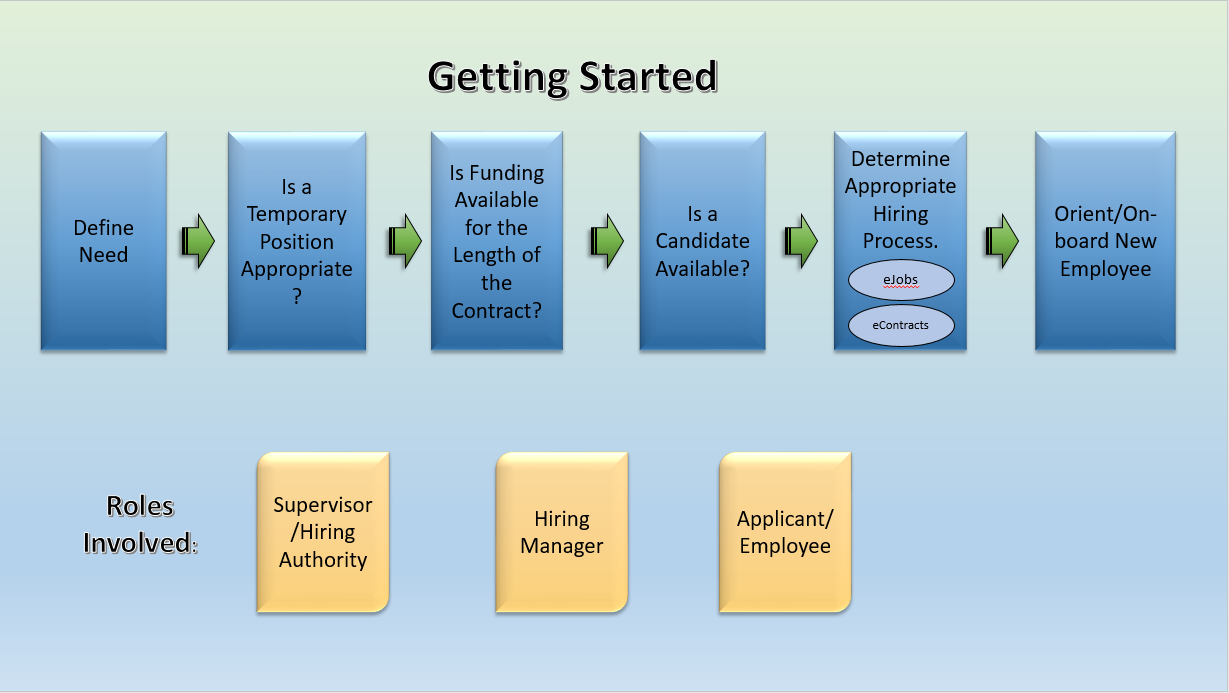
Getting Started
-
What Information Do I Need to Get Started?
-
Which System Should Be Used?
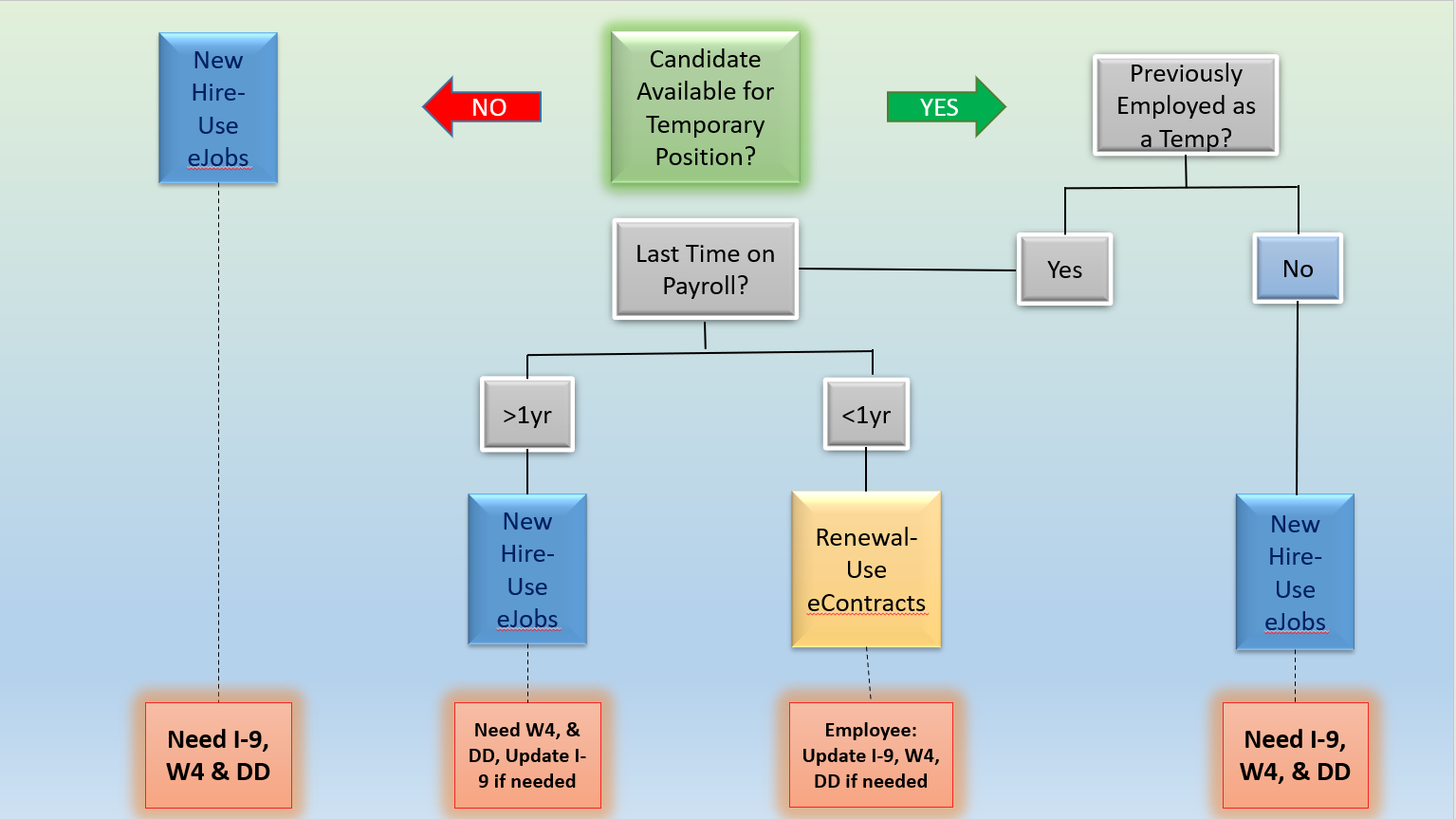
Individuals that have been employed as a temp within the last year can be hired through eContracts. Please note:
Departments that hire an existing temporary employee with an active contract may be responsible for the cost of ACA benefits and overtime pay for any hours worked over 40 hours (hours are combined).
-
What Type of Posting Is Best?
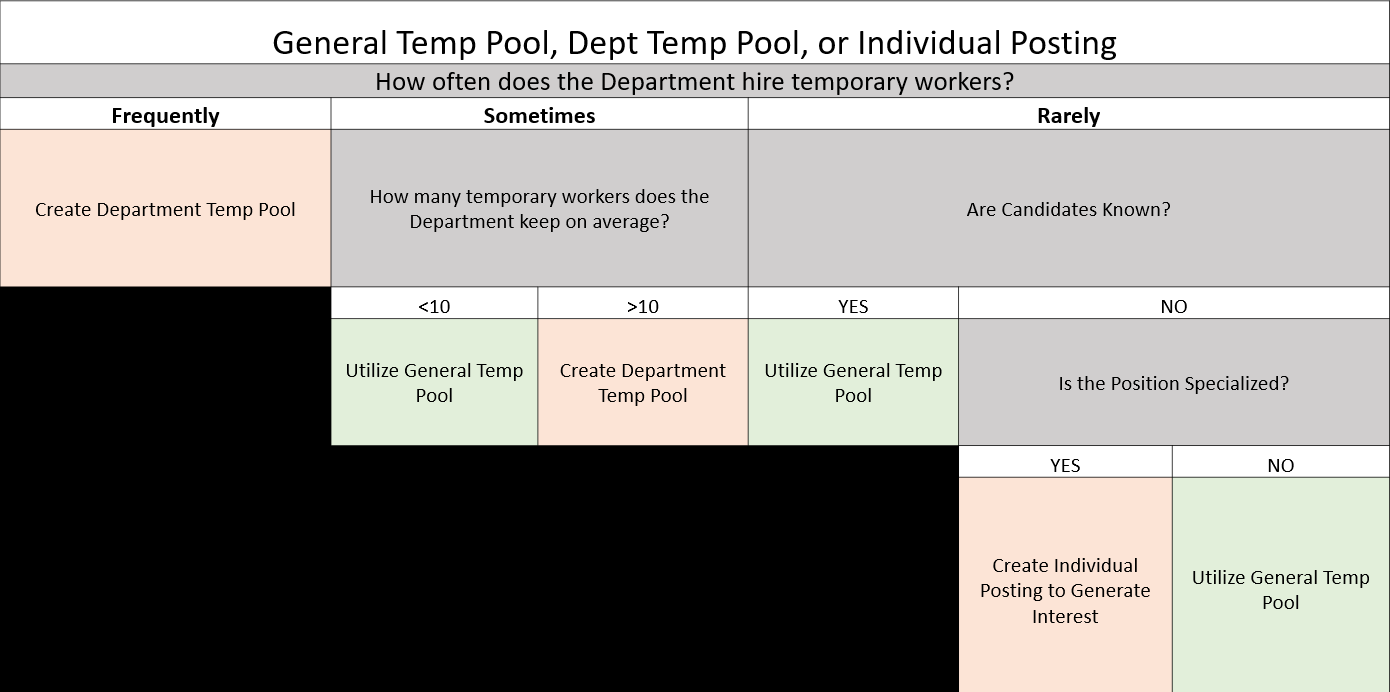
NOTE: This chart is meant to be used as a guideline to assist you. If needed, you may choose to advertise your temporary vacancy through eJobs.
For access to the Temporary Staff Pool, contact Human Resources at HR@etsu.edu for the guest user login/Hiring Manager Access. From the posting Applicants tab, enter keywords in the Search box to search for applicants with specific skills. For a quick view of the applicants' skills and education, select the 'Temp Pool Search' from the Saved Searches button. Contact applicants directly to discuss qualifications and availability. Download the Temporary Hire Checklist for guidelines on submitting a temporary hire.
Training Videos:
A posting must be set up for all different types of temporary hires.
- Support Staff/Hourly Temporary hires should have a Support Staff posting.
- Administrative/Monthly Temporary hires should have an Administrative posting.
- Temporary Faculty/Adjuncts- you can post temporary faculty/adjunct positions, but hiring may need to be processed through eContracts. Please check with your HR Business Partner.
Recommended Temporary Pool Posting Title Format:
20xx/20xx (department) Temporary (position type) Pool"
Position Type Options: Support Staff/Administrative Staff/Faculty/Adjunct
Temporary Pool Posting Example:
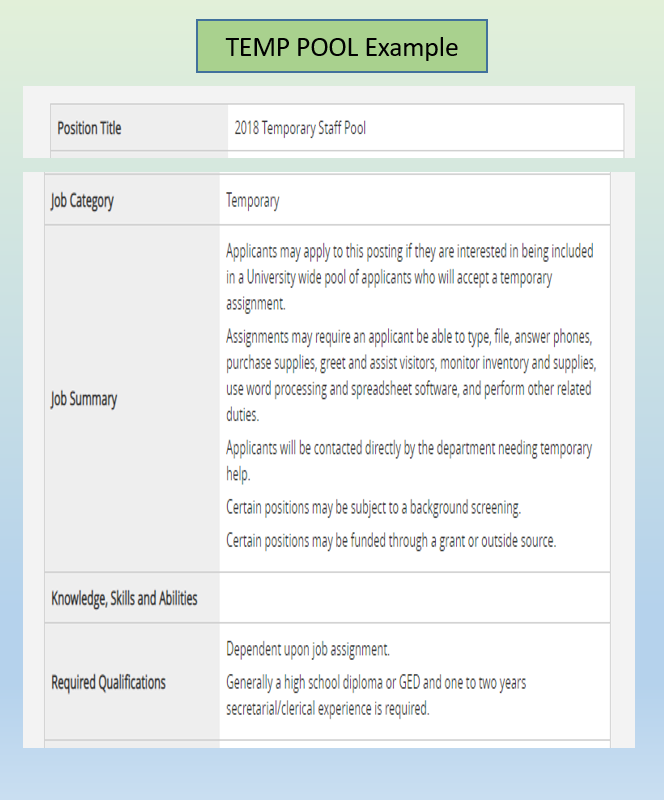
Temporary Posting Example:
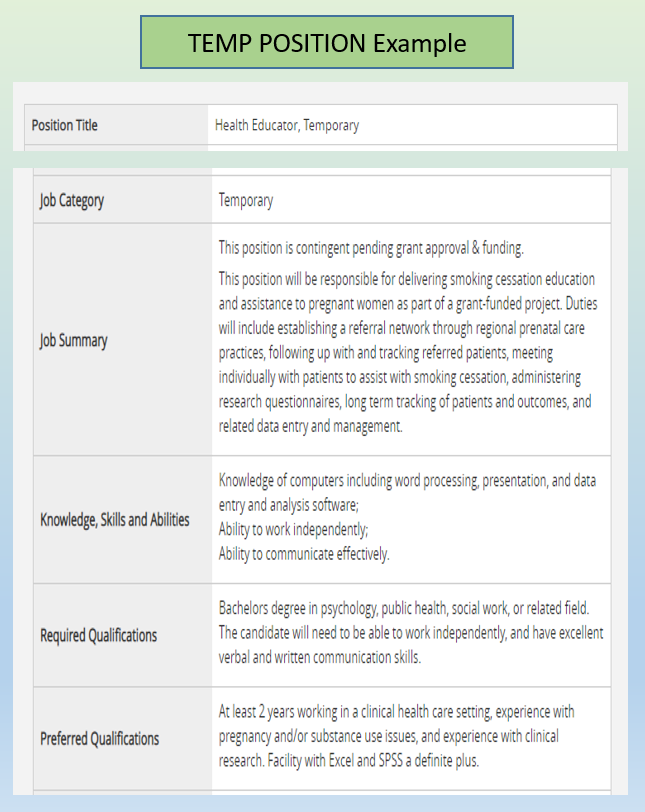
Postings should include the following supplemental questions:
- Are you currently working as a Federal Student Worker?
- Are you employed as a Graduate Assistant?
- Do you have other current or pending temporary contracts?
- If yes to any of the above, please enter the total hours worked per week for each position.
-
Things to Remember
- Temporary employees are appointed for periods of less than one-year.
- Temporary hires are approved for a maximum of one year.
- Temporary contracts may not cross a fiscal year.
- Temporary employees are ineligible for State benefits (retirement, state insurance, annual and sick leave, holiday pay, or longevity credit).
- Temporary employees working on average at least 30 hours per week over a specified measurement period will be offered medical benefits under the Affordable Care Act (ACA).
- Faculty who are not tenure-track and have a one year appointment are also designated as Temporary.
- All full-time and one year temporary appointments (with benefits) are required to be advertised.
- All positions offering benefits must be advertised.
- There is no requirement to advertise one-semester temporary faculty/adjunct and/or any position that is less than a one year position and without benefits.
- Hourly temporary employees are paid on the 15th and the last working day of the month; pay is not current.
- At this time new employees are required to come by the Office of Human Resources (Burgin Dossett Hall, Room 307) to complete all required hiring paperwork before final work authorization is given.
Hiring Processes
-
Systems:
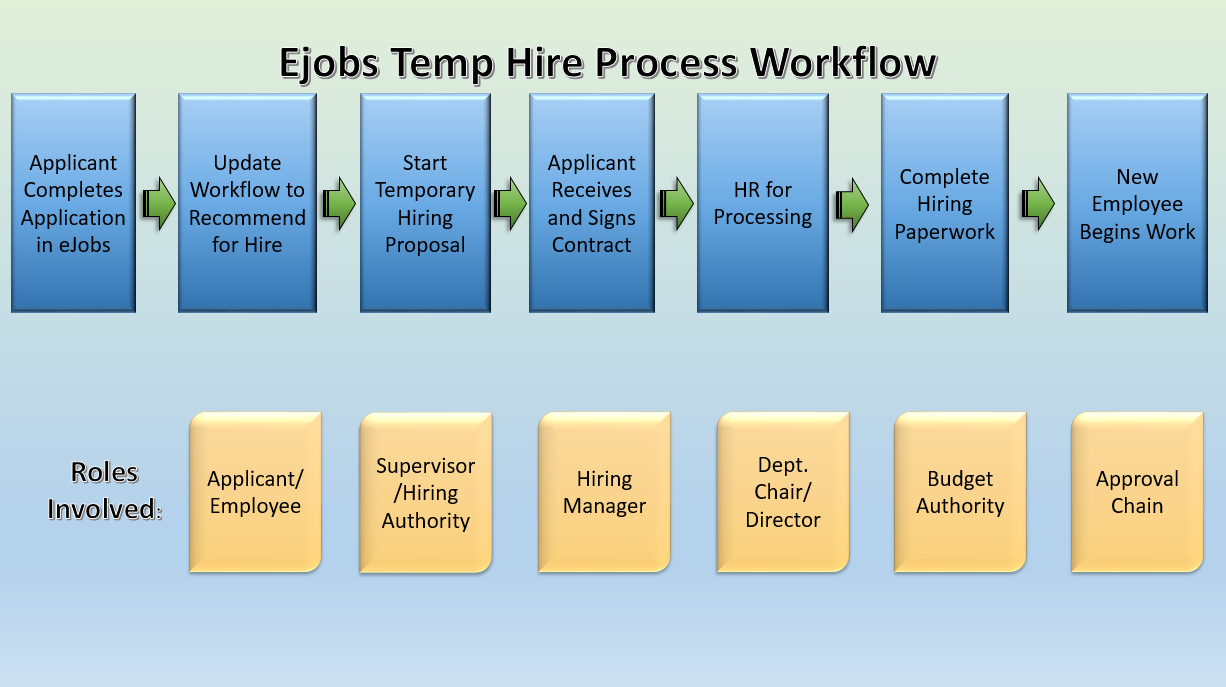
- eJobs
-
*Use the eJobs System for New Hires
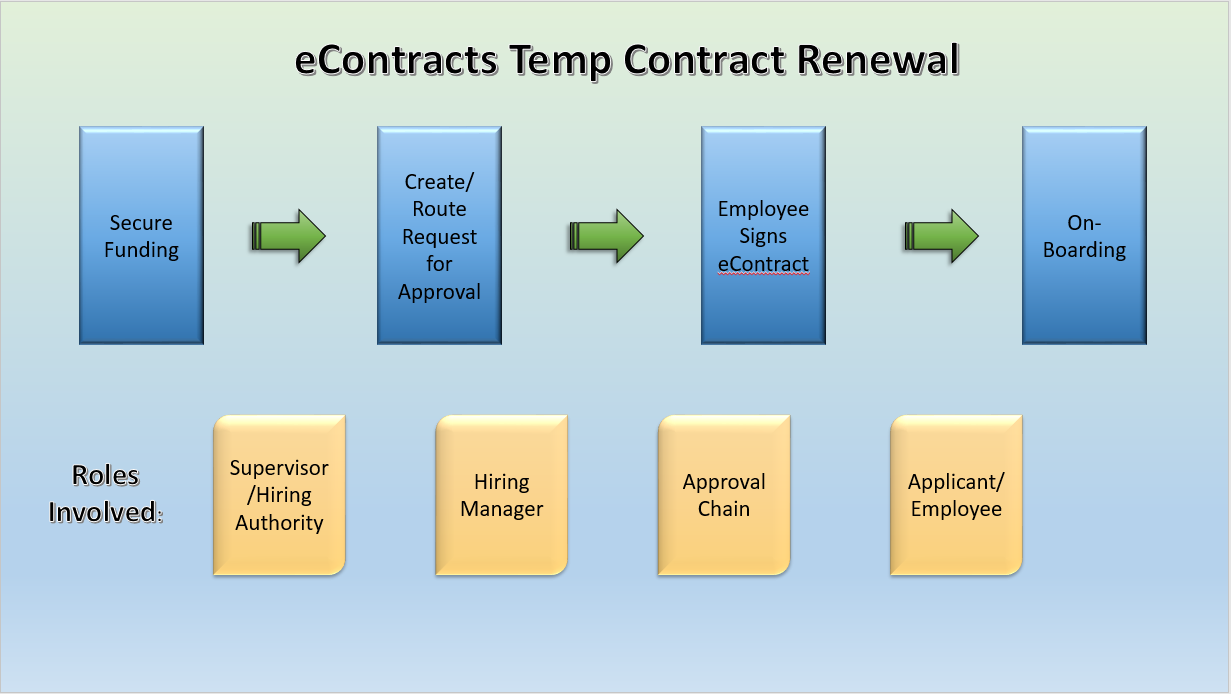
- eContracts
-
*Use the eContracts System for Renewals.
-
Process Workflows:
-
eJobs
-
Postings
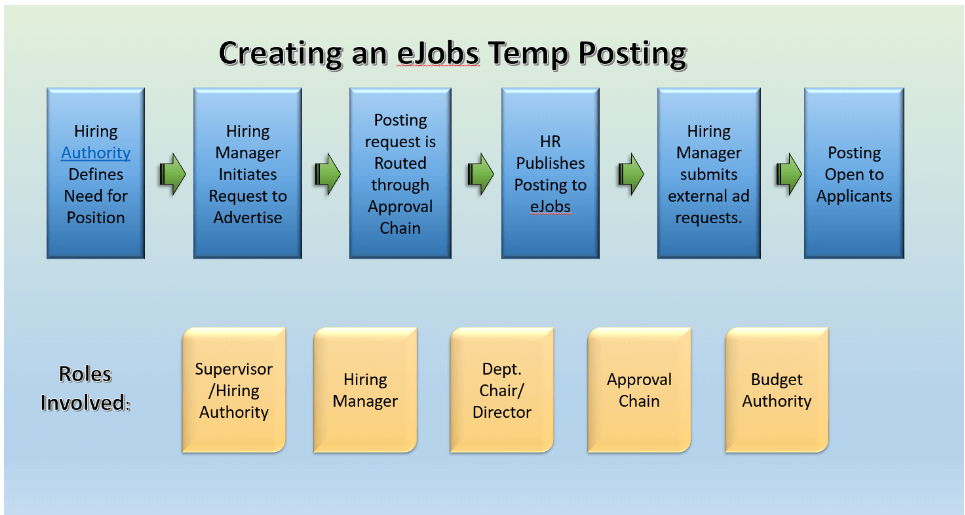
- Roles and Expectations Coming Soon!
-
Hiring Proposals
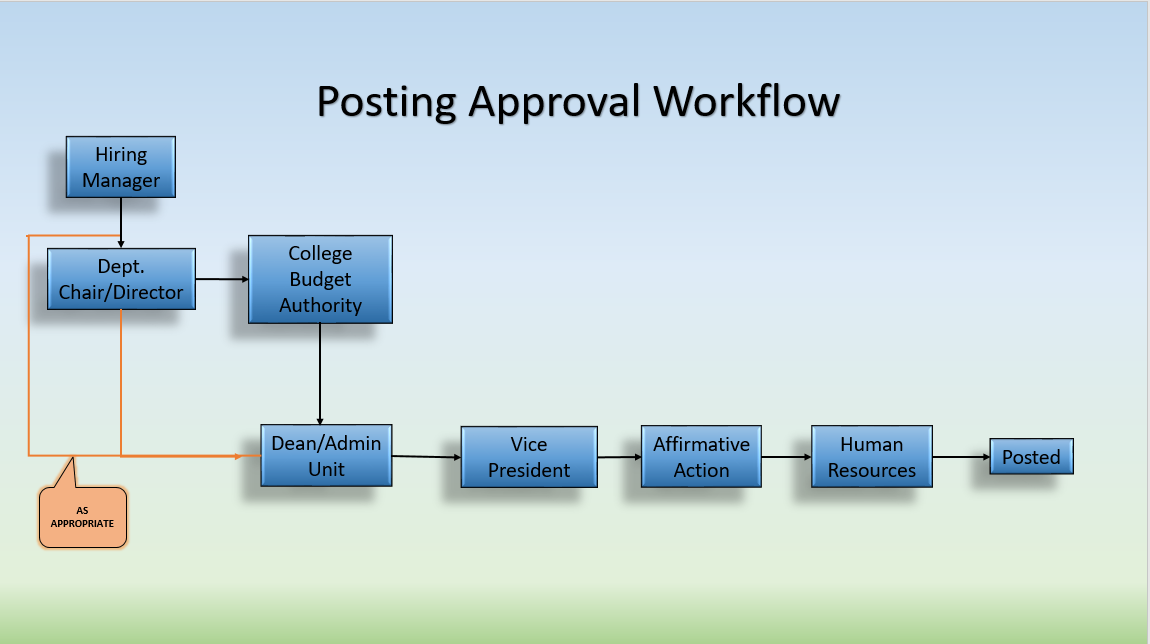
Hiring Proposal Approval Workflow:
Each step of the approval chain has multiple options to move a hiring proposal forward or backward through the approval process.
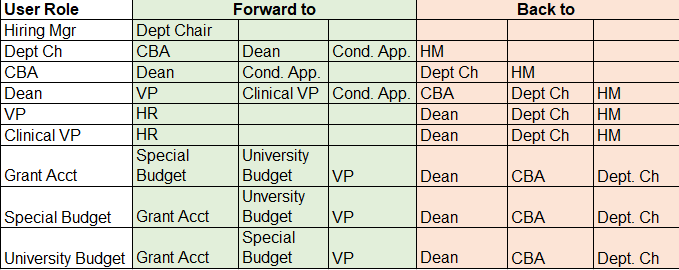
- Roles and Expectations Coming Soon!
- Approval Chain List
-
-
eContracts
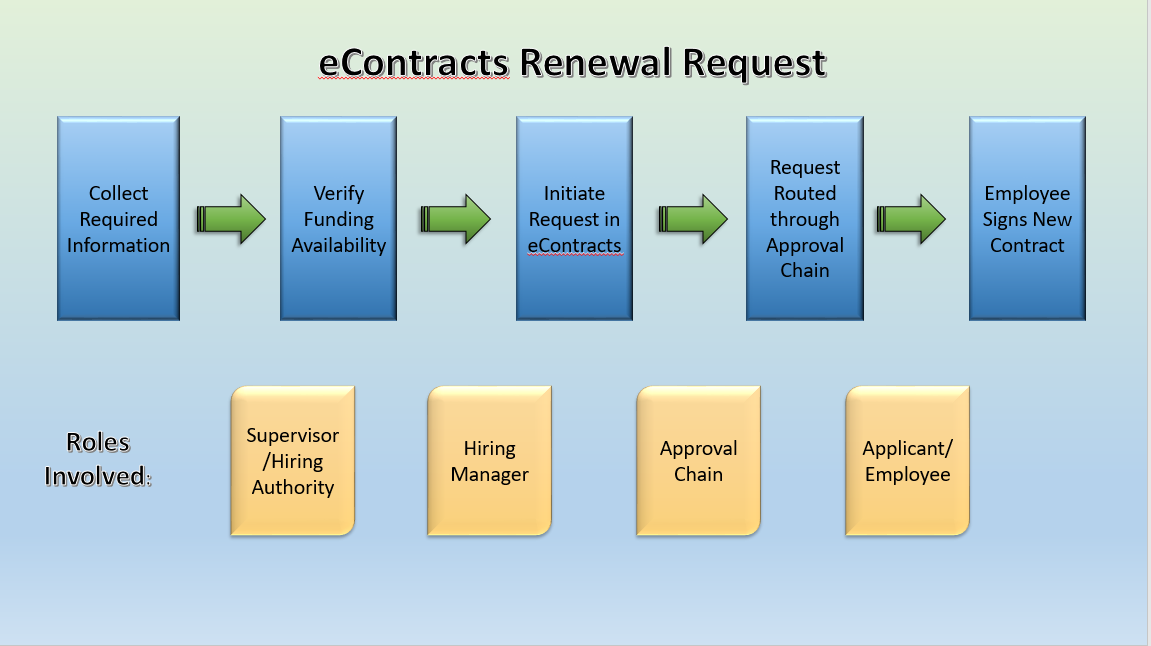
- eContracts Temporary Contract Renewal Workflow
- eContracts Guide for Hiring Managers
- Roles and Expectations Coming Soon!
-
-
Training Materials:
Who is Involved?
-
eJobs User Groups
User Group:
Available Actions:
Employee View personal position description and performance appraisals. Applicant Reviewer View applicant applications for a specific posting and move applicants to different work states (e.g. Recommend for Interview) Search Committee Member View applicant applications for a specific posting. Hiring Manager Create postings and hiring proposals for an assigned department(s) or division; Able to request minor changes to a position description in the Position Management module. Dept. Chair/Director; Dean/Administrative Unit; Vice President/President Create, review, and approve postings and hires for a department, function, or division; Able to request minor changes to a position description in the Position Management module. University Budget Review and approve hires for the University. College Budget Authority Review and approve postings and hiring proposals in academic divisions. Grant Accounting Review and approve grant funded hires. -
Roles, Responsibilities, & Expectations
More Information Coming Soon! -
Approval Chains
**Notify HR at hr@etsu.edu of any updates/changes to listed approval chains.**
- NO employee is to be allowed to begin work prior to notification from the Office of Human Resources that the appointment has been approved. Department heads that allow potential employees to begin work prior to formal approval may be personally liable for wages, fines and fees, due during the period prior to formal approval being obtained.