Academic Advisors and Campus Partners – Athletics, CFAA, Housing, Jordan Center, TRIO, Veteran’s Services – collaborate to support outreach efforts for Academic Alert reporting. During weeks 3, 4, and 5, Advising Leads, campus partners, and support services receive a list of students who are deemed at-risk to conduct outreach.
Academic Alert Timeline
In a given term, the Office of the Executive Director of Academic Advisement (OEDAA) will send cumulative lists on the Fridays of weeks 3, 4 and 5, and the Monday of week 6.
College Advising Office lists will:
-
- exclude Learning Support Reading (LS-R), Athletic, Jordan Center, MAVS, and TRIO affiliated students
- include all Missing Assignments Alerts for major - or program - specific courses
University Advisement Center (UAC) lists will include:
-
- All Notification reasons in all courses
- All LS-R and Undecided students
Campus Partner lists will include:
-
- All Notification reasons in Compass Core courses
- Students who have an assigned relationship type (LS, Athletic, ASSC Student Success Educator, Jordan Specialist, MAVS, and TRIO Advisor)
Advising Leads, campus partners, and support services units are strongly encouraged to run the Notification or Referral report for their Care Unit to review students with alerts. For visual guidance, see the V3 Running Notifications or Referrals Report user-guide.
Academic Alert Outreach Process
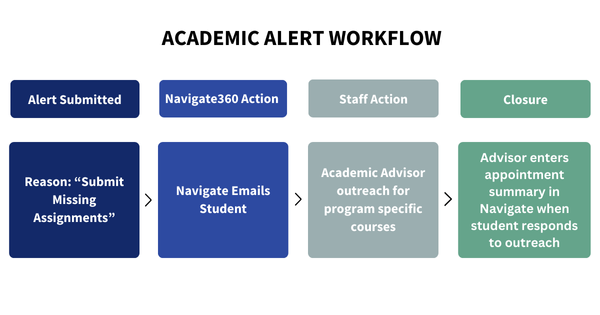
Academic Advisors
Academic Advisors contact students who:
-
- Have received a Missing Assignments Alert in a major - or program-specific - course
- Do not have an Area Coordinator (Housing), Athletic, LS, MAVS, or TRIO advisor
For conducting outreach, Advisors run an Appointment Campaign in Navigate360 using the Outreach Initiatives Care Unit, at the Academic Advisement Location, for the Academic Alert Outreach Service. For visual guidance, see the Creating Academic Alerts Appointment Campaign user-guide to create these campaigns. For help adding a student to a launched campaign, see the Adding New Students to a Launched Campaign user-guide.
When students respond to outreach, Advisors will document an Appointment Summary in Navigate360.
Campus Partners
-
Area Coordinators (Housing)
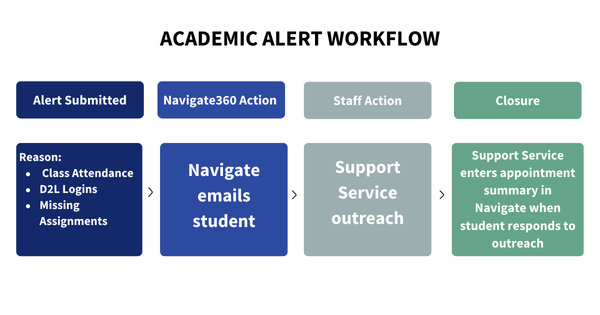
When an alert is issued for all Notification reasons (Encourage Class Attendance, Encourage D2L Log-ins, Missing Assignments), Area Coordinators receive an email from Navigate360 with notice that their student has received an alert. Area Coordinators will conduct outreach in their residence hall areas for students who:
-
- Do not have an Athletic advisor
- Do not have a Jordan Center Specialist relationship
- Do not have a TRIO advisor
- Do not have a Veteran advisor
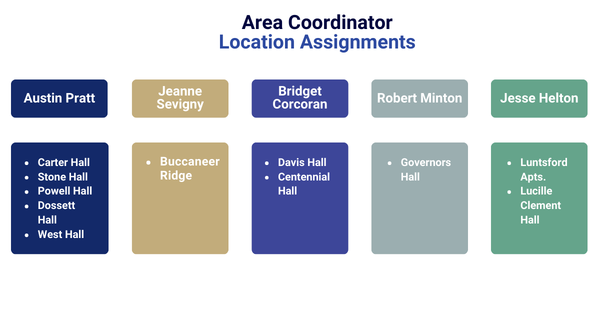
When students respond to outreach, Area Coordinators will document an Appointment Summary in Navigate360 using the Outreach Initiatives Care Unit, at the Student Life Location, for the Academic Alert Outreach Service.
While Campus Partners are provided a list on the Fridays of weeks 3, 4, and 5 of a term, Area Coordinators are encouraged to run their own Progress Reports report for a list of their students. For report guidance, see the H&RL AC Progress Reports Report user-guide.
-
-
Athletics
When an alert is issued for all Notification reasons (Encourage Class Attendance, Encourage D2L Log-ins, Missing Assignments), Athletic Advisors receive an email from Navigate360 with notice that their student has received an alert. Athletic Advisors conduct personalized outreach through Navigate360.
When students respond to outreach, Athletic Advisors will document an Appointment Summary in Navigate360 using the Outreach Initiatives Care Unit, at the Student Life Location, for the Academic Alert Outreach Service.
-
Center for Academic Achievement (CFAA)
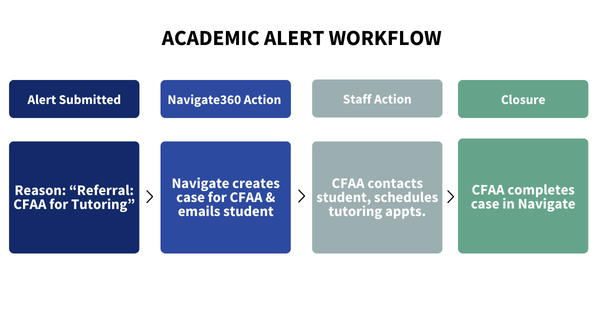
The Center for Academic Achievement (CFAA) contacts students who have a Referral: CFAA for Tutoring alert using Navigate360 Appointment Campaigns. Students are encouraged to schedule an appointment for the specific course the referral was made for. Contact information for the CFAA and TRIO tutoring services are provided for appointment help.
CFAA Campaign Messaging
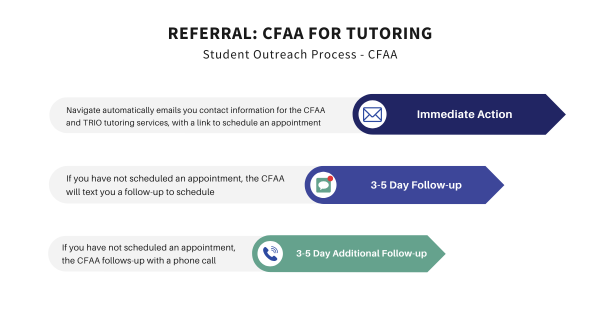
Academic Advisors do NOT need to make an additional referral to the CFAA for students who already have been referred by their professors. See the CFAA Course Support List to find Tutoring and Supplemental Instruction (SI) help.
-
Jordan Center
When an alert is issued for all Notification reasons (Encourage Class Attendance, Encourage D2L Log-ins, Missing Assignments), Jordan Specialists receive an email from Navigate360 with notice that their scholars have received an alert. Jordan Specialists conduct personalized outreach through Navigate360.
- NOTE: The Jordan Center receives all Notification reasons for Jordan Scholars, excluding Learning Support Reading, Athletic, Housing, TRIO, and Veteran students.
- NOTE: The Jordan Center receives ALL Encourage Class Attendance and Encourage D2L Log-ins reasons for students who do not have an Athletic, Housing, TRIO, and Veteran relationship type.
When students respond to outreach, Jordan Specialists will document an Appointment Summary in Navigate360 using the Outreach Initiatives Care Unit, at the Student Life Location, for the Academic Alert Outreach Service.
-
Military and Veteran Services (MAVS)
When an alert is issued for all Notification reasons (Encourage Class Attendance, Encourage D2L Log-ins, Missing Assignments), Veteran Advisors receive an email from Navigate360 with notice that their student has received an alert. MAVS Advisors conduct personalized outreach through Navigate360.
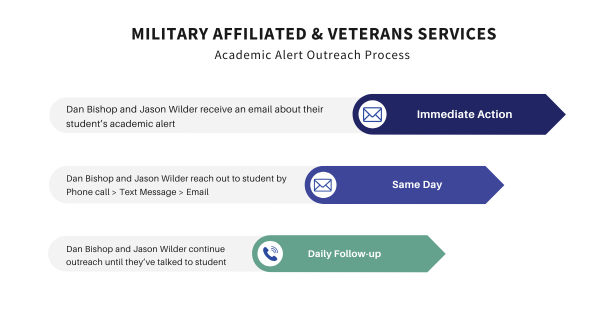
When students respond to outreach, Veteran Advisors will document an Appointment Summary in Navigate360 using the Outreach Initiatives Care Unit, at the Academic Advisement Location, for the Academic Alert Outreach Service.
-
TRIO
When an alert is issued for all Notification reasons (Encourage Class Attendance, Encourage D2L Log-ins, Missing Assignments), Athletic Advisors receive an email from Navigate360 with notice that their student has received an alert. Athletic Advisors conduct personalized outreach through Navigate360.
When students respond to outreach, TRIO Advisors will document an Appointment Summary in Navigate360 using the Outreach Initiatives Care Unit, at the Academic Advisement Location, for the Academic Alert Outreach Service.
-
UAC - Learning Support Reading
UAC Academic Advisors contact students for:
-
- All Notification reasons (Encourage Class Attendance, Encourage D2L Log-ins, Missing Assignments) in all courses
- All LS-R and Undecided students
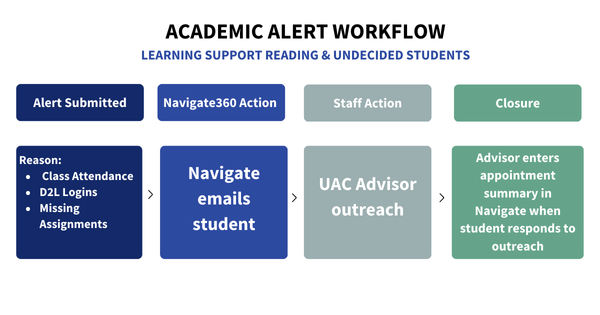
For conducting outreach, Advisors run an Appointment Campaign in Navigate360 using the Outreach Initiative Care Unit, at the Academic Advisement Location, for the Academic Alert Outreach Service. For visual guidance, see the Creating Academic Alerts Appointment Campaign user-guide to create these campaigns. For help adding a student to a launched campaign, see the Adding New Students to a Launched Campaign user-guide.
When students respond to outreach, Advisors will document an Appointment Summary in Navigate360.
-
FAQs
-
I'm an Academic Advisor, what Academic Alert outreach am I responsible for
- Academic Advisors are responsible for reaching out to students who have received a Missing Assignments Alert in a major - or program-specific - course who do not have an Area Coordinator (Housing), Atheltic, LS, MAVS, or TRIO advisor.
-
I'm a Campus Partner, what Academic Alert outreach am I responsible for
- Campus Partners are responsible for reaching out to students for all Notification reasons (Encourage Class Attendance, Encourage D2L Log-ins, Missing Assignments) in Compass Core courses.
- This outreach encourages students to schedule an appointment with you to discuss how you can support them!
- See the Creating Academic Alerts Appointment Campaign user-guide for outreach guidance.
- LS, Athletic, Area Coordinator, MAVS, and TRIO Advisors provide additional personalized outreach.
-
Can I submit an alert outside of the term's week 3-5 window
- Yes; the official Academic Alert campaign runs during weeks 3-5, but Staff can submit alerts anytime during the semester if they are concerned about a student. Users will submit an Ad-hoc Notification or Referral. See the Issue Notification or Referral from Staff Profile user-guide for visual instructions.