Welcome to the Faculty Training Resources Page
New resources will be added to this page as they become available.Training content is accessible only with an ETSU account.
Voyager 101
The Voyager training website is the hub for all training materials. Review Voyager 101 training materials for information relating to:
- Basic system navigation
- submitting leave requests
- viewing personal and compensation information
- Self-Service Pay (accessing pay details and updating payment methods)
- Expenses
- Mobile App
Training materials
The Decentral Training Resources page lists all available guides and is organized by interest area. Commonly used guides include:
-
Expenses
- Personal Purchase on Corporate Card - Quick Reference Guide
- Special Process Request, Check Requests, and Personal Services Wire - Job Aid
- Manage Expense Reports - Quick Reference Guide
- Manage Spend Authorization - Job Aid
- Request Cash Advance - Video
- Special Handling Request (Check Request/Personal Services)
- Expense Delegation - Video
- Travel Authorization Overview - Video
- How to Enter a Travel Expense Claim - Job Aid
- Travel and Expense Reports
- This webinar-style recorded video guides users through creating Expense Reports, travel authorization and documentation, expense types, and reimbursement policies.
-
Principal Investigator
- Award and Project View - Quick Reference Guide
- This guide provides an overview of how to view project financial performance through reporting for Campus users with View access.
- Restricted Funds not mapping to PPM resource Excel file.
These materials are also available on the Principal Investigator page.
- Award and Project View - Quick Reference Guide
Time and Absence
Academic year faculty members will not submit time cards. However, faculty will use the Add Absence function for absence/leave requests. Although faculty in academic year positions do not accumulate annual leave, other types of leave (sick, holiday, administrative, parental, etc.) must still be entered.
Adjunct Faculty are exempt employees and will not use time cards. Adjunct faculty do not accumulate leave.
Visual of what will be used in Voyager's Time and Absence Module:
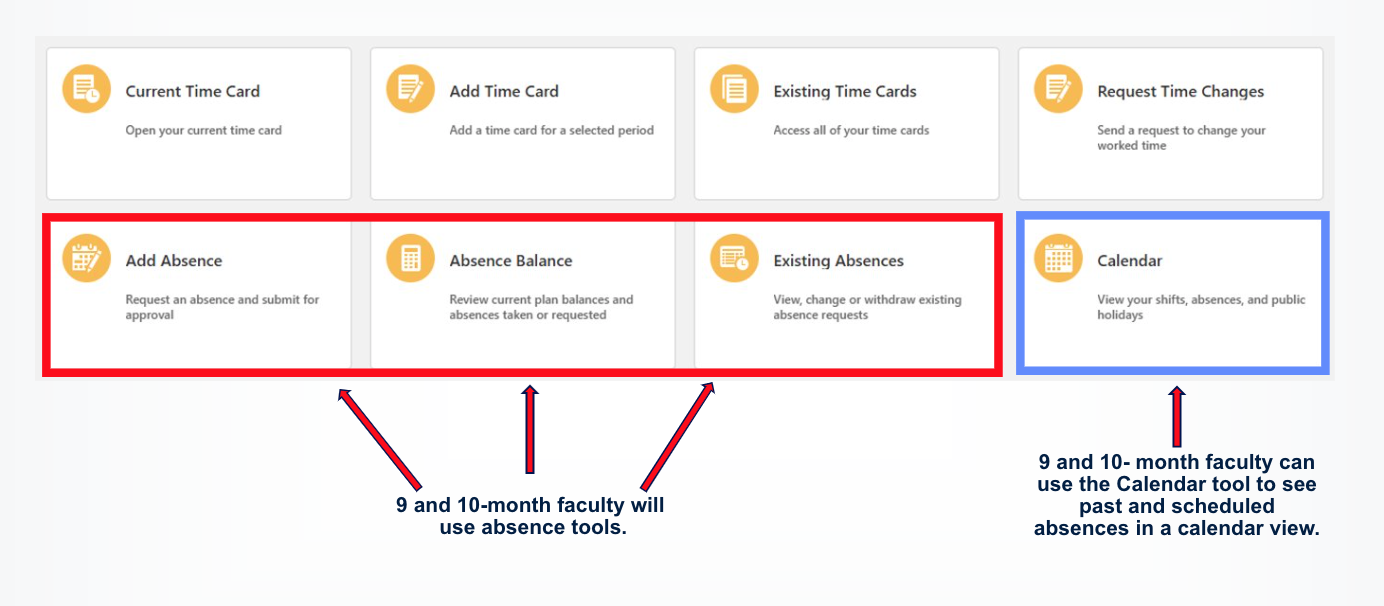
Holiday Leave Entry. Previously, holiday leave time was automatically added to timesheets. In Voyager, employees are responsible for recording holiday leave. Entering holiday leave will be done the same way as submitting an absence.
Supervisor Role
Faculty in a supervisor role should visit the Supervisor Training Resource Page to access guides for time card and absence/leave approvals.
Past Recorded Trainings